HTML and Regexp

I was browsing through a few “Daily WTF”, and came across this one, which straight away made me think of this hilarious SO response about the evil of parsing HTML with Regexp. Here is a short excerpt that doesn’t even do justice to the whole thing:

Every time you attempt to parse HTML with regular expressions, the unholy child weeps the blood of virgins, and Russian hackers pwn your webapp. Parsing HTML with regex summons tainted souls into the realm of the living. HTML and regex go together like love, marriage, and ritual infanticide.

Incidentally, probably the most creative use of utf-8 I have seen so far…

Find in Which SVN Revision a File Has Been Deleted

It looks like the only way is to get the full Subversion log:

sebastien@greystones$ svn log --verbose > /tmp/svnlog.txt

and then look for the first reference of the deleted file in /tmp/svnlog.txt.

(You could possibly grep, but this file could be part of a large changeset, so you don’t really know how many lines in --before-context to use to get the revision number)

Limoges en Pro A !

Limoges qui célèbre la victoire de Pau-Orthez, un truc de dingue ! Pau était déjà assuré de monter, et une victoire contre Aix Maurienne permettait à Limoges de monter également. La vidéo du compte à rebours est à donner des frissons !!

PHP and UTF-8

PHP characters (5 and prior) are one-byte long. When working with UTF-8, this becomes an incredible royal PITA and an endless source of frustration, even for people used to work with characters present in latin-1. Even more annoying, some functions such as htmlentities, htmlspecialchars, etc. just assume latin-1 by default, and you have to remember to explicitly set the encoding, e.g.:

htmlentities($string, ENT_COMPAT, ’UTF-8’);

But it also has some extremely annoying consequences for simple string functions such as substr or strlen. Typically:

$ echo ’<?php echo strlen("é"); ?>’ | php
2

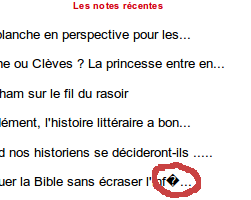
Let’s look at an example seen this morning on a popular literary French blog running on the also popular platform Wordpress:

14.png

And here is more than likely what happened here: characters in PHP are one-byte long, but as we have seen in the past, characters in UTF-8 strings may be longer than one-byte (up to 4). â belongs to the Latin-1 supplement group, and is encoded on 2 bytes: C3 A2. As substr only deals with 1-byte characters, it simply cut “â” in the middle, leaving C3 in, and getting rid A2. C3 on its own is obviously invalid UTF-8, so it is replaced by the replacement character. Here is a file simulating this:

<html>
  <head>
  <meta http-equiv="Content-Type" content="text/html; charset=utf-8" />
  </head>
  <body>
  <p>
<?php
$text = "Critiquer la Bible sans écraser l’infâme";
echo substr($text, 0, 41);
?>
</p>
</body>
</html>

The solution is to use the multi-byte strings functions—but they have to be included in the PHP installation explicitly, as mbstring is a non-default extension. Here is an example with mb_substr:

<html>
  <head>
  <meta http-equiv="Content-Type" content="text/html; charset=utf-8" />
  </head>
  <body>
  <p>
<?php
mb_internal_encoding("UTF-8");
$text = "Critiquer la Bible sans écraser l’infâme";
echo mb_substr($text, 0, 37);
echo "<br />";
echo mb_substr($text, 0, 38);
?>
</p>
</body>
</html>

(You will probably notice that I changed the index after which the string is truncated. That’s because strlen is also based on 1-byte character, so when it counts the characters in a string that contains UTF-8 characters encoded with more than 1 byte, it “sees” more characters… So as mbstring functions now can deal with multi-byte characters, we have to cut the string earlier to see whether “â” avoids the chop.)

AFAIK, PHP 6 will have Unicode support, so it will be the end of all this craze, but it’s something to take into account when dealing with PHP 5 apps…

^{1} UTF-8 is a popular encoding on the Web mainly because it is a variable width encoding where ASCII characters are encoded on one byte, most of European, Cyrillic, Arabic, Hebrew ones on 2 bytes, and the rest of the world use 2, 3 or 4 byte-long characters (so it made the English-speaking users happy as (1) writing text in ASCII is “automatically” in UTF-8, as the two match, and (2) it doesn’t increase the size of their file).

RTÉ Big Big Bazaar

With the joys of having a kid come the joys of getting up early at weekends and watching kids programmes on TV. I usually tune to TV5 to give Sophie a bit more French than during the week (if she grows up with a strong and a lively Québécois accent, don’t look any further!), but occasionally, I switch back to RTÉ. And at the weekend, I came across this programme called the Big Big Bazaar. Great idea and all: you get 2 teams of kids (something between 8 and 11) to collect stuff from local households to raise money for a local cause (a GAA club, a school band, etc.). It is a brilliant idea, and it’s great to see the kids visiting grandmothers to get the recipe of scones, or sorting through pile of junk for selling the items. Then, for 2 hours, the 2 teams try to sell a max of things.

Great idea, until it came to the end. The boys won, they raised something like 1,200+, and unfortunately, the girls only raised a bit more than 1,100€. So the girls lost. They are all very very disappointed, they worked so hard, and fell about a 100€ short… Then, the presenter swiftly says: “According to the rules of the Big Big Bazaar, the girls therefore have to give half of their money to the boys. Too bad…”

Whaaaaat? How mean is that?? So instead of raising (say) 1,100€, they now raise 550€, and give the rest to the boys. I find this just wrong. Ok, we have to teach our kids they can’t always win, but what sort of lesson are we trying to teach them here: if you lose, you’ll end up giving half your earnings to the winner?? Maybe that’s just me, but that doesn’t feel right to take money away from kids who’ve worked hard to get that money.

Why does “é” become “é”? (II)

Now, let’s have a look at a classic “problematic” situation illustrating this problem. This example will use PHP/MySQL, as this is quite simple to set up.

First, let’s create a database, with a table storing in latin-1:

sebastien@greystones:~$ mysql -u root -p
Enter password: 
Welcome to the MySQL monitor.  Commands end with ; or \\g.
Your MySQL connection id is 91
Server version: 5.1.41-3ubuntu12 (Ubuntu)

Type ’help;’ or ’\\h’ for help. Type ’\\c’ to clear the current input statement.

mysql> CREATE DATABASE sandbox;
Query OK, 1 row affected (0.00 sec)

mysql> CREATE TABLE sandbox.a (val VARCHAR(255) CHARACTER 
SET latin1 COLLATE latin1_general_ci NOT NULL);
Query OK, 0 rows affected (0.08 sec)

CHARACTER SET defines the encoding used, whereas COLLATE indicates which set of rules are to be used for character comparison (for sorting). For more details, see the MySQL documentation. When creating a new database, the default character set is latin1, and the default collation is latin1_swedish_ci, unless you have specified otherwise when starting mysqld or changed these values wen creating or altering the db. So, so far, we have a database that only deals with latin-1.

Let’s now have a look at the PHP page:

<?php 
print ’<?xml version="1.0" encoding="utf-8" ?>’;
$con = mysql_connect("localhost","root","toto");
if (!$con) {
  die(’Could not connect: ’ . mysql_error());
}

mysql_select_db("sandbox", $con);

// Insert values
if (isset($_POST["val"])) {
  $val = $_POST["val"];
  mysql_query("INSERT INTO a (val) VALUES (’$val’)") or die(mysql_error());
}

// Retrieve values
$values = array();
$result = mysql_query("SELECT val FROM a");
while ($row = mysql_fetch_array($result)) {
  $values[] = $row["val"];
}
mysql_close($con);
?>

<!DOCTYPE html PUBLIC "-//W3C//DTD XHTML 1.0 Strict//EN" "http://www.w3.org/TR/xhtml1/DTD/xhtml1-strict.dtd">
<html xmlns="http://www.w3.org/1999/xhtml" xml:lang="en" lang="en">
<head>
  <title>Test Form</title>
  <meta http-equiv="Content-Type" content="text/html; charset=utf-8" />
</head>
<body>
<form action="index.php" method="post">
  <fieldset>
    <legend>Stuff</legend>
    <input type="text" name="val" maxlength="255" />
    <input type="submit" name="Submut" value="Go" />
  </fieldset>
</form>
<?php if (count($values) > 0): ?>
<ul>
  <?php foreach ($values as $v): ?>
  <li><?= $v ?></li>
  <?php endforeach; ?>
</ul>
<?php endif; ?>
</body>
</html>

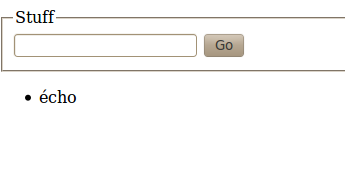
(Note: this PHP file is rather simplistic, there is no validation, or anything, and everything is stuffed in the same file; not to be used in real life!) As you can see from the XML directive, as well as the Content-Type meta, we are working with the UTF-8 character set. If we use this form to enter the word “écho” in the database, we get the following:

11.png

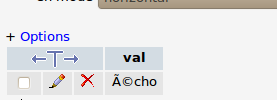
Everything looks fine. However, in phpMyAdmin:

12.png

Looks familiar? Here, the web page assumes UTF-8, but stores the data in latin-1. If you go from UTF-8 to latin-1, and then back to UTF-8, you’ll obviously get the same thing:

sebastien@greystones:~$ iconv -f iso-8859-1 -t utf-8
é
é
sebastien@greystones:~$ iconv -f utf-8 -t iso-8859-1 
é
é

However, if the page had displayed the result in latin-1 (like phpMyAdmin does, presumably based on the encoding of the database), we would have had the same funky result.

What about the opposite then? Now we assume the data is stored in UTF-8, and the page is iso-8859-1.

 mysql> DROP DATABASE sandbox;
Query OK, 1 row affected (0.00 sec)

mysql> CREATE DATABASE sandbox CHARACTER SET utf8 COLLATE utf8_unicode_ci;
Query OK, 1 row affected (0.00 sec)

mysql> CREATE TABLE sandbox.a (val VARCHAR(255) NOT NULL); 
Query OK, 0 rows affected (0.09 sec)

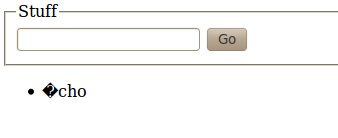
The page is “made” latin-1 by removing the xml directive, and charset is changed to iso-8859-1. And here is the result:

13.png

Also:

mysql> SELECT val from sandbox.a;
+------+
| val  |
+------+
| �cho |
+------+
1 row in set (0.00 sec)

The replacement character (�) appears. Why? “é” is 0xE9 in latin-1, that is 11101001, which is not a possible value for UTF-8 (as we have seen, 1-byte long characters start with a 0. 3-byte characters do start with the 1110 sequence, but the following octet should start with 10 – it’s not the case as the following character is c, (0x63 in latin-1, i.e. 01100011), so as something is obviously wrong, the replacement character is displayed.

Also, in the news, First IDN ccTLDs now available (IDN stands for Internationalized Domain Name).
Why does “é” become “é”?

As I said before, encoding issues are quite common, and yet, they can be very tricky to debug: the reason is that any link in the long chain between the data storage (sql or not) and the client can be the culprit and has to be investigated. I have recently experienced this first hand, and it was tricky enough to be the object of a future post.

In short, the problem was that a PDF document produced by PDFLaTeX in iso-8859-1 was incorrectly forced into UTF-8, therefore corrupting the binary file as a result. The sure sign of this was that single characters were “converted” into 2 or more characters, for example: “é” was displayed as “é”. Anybody who’s worked on non-ASCII projects (probably 98% of the non English-speaking world) has had a similar problem, I’m sure.

But why does “é” become “é”, why that particular sequence:

sebastien@greystones:~$ iconv -f latin1 -t utf8
é
é

?

The reason lies in the UTF-8 representation. Characters below or equal to 127 (0x7F) are represented with 1 byte only, and this is equivalent to the ASCII value. Characters below or equal to 2047 are written on two bytes of the form 110yyyyy 10xxxxxx where the scalar representation of the character is: 0000000000yyyyyxxxxxx (see here for more details).

“é” is U+00E9 (LATIN SMALLER LETTER E WITH ACUTE), which in binary representation is: 00000000 11101001. “é” is therefore between 127 and 2027 (233), so it will be coded on 2 bytes. Therefore its UTF-8 representation is 11000011 10101001.

Now let’s imagine that this “é” sits in a document that’s believed to be latin-1, and we want to convert it to UTF-8. iso-8859-1 characters are coded on 8 bits, so the 2-byte character “é” will become 2 1-byte-long latin-1 characters. The first character is 11000011, i.e. C3, which, when checking the table corresponds to “Ô (U+00C3); the second one is 10101001, i.e. A9, which corresponds to “©” (U+00A9).

What happens if you convert “é” to UTF-8… again? You get something like “Ã?©” (the second character can vary). Why? Exactly the same reason: “Ô (U+00C3) is represented on 2 bytes, so it becomes 11000011 10000010 (C3 82), and “©” (U+00A9) becomes 11000010 10101001 (C2 A9). U+00C3 is, as we saw Ã, U+0082 is BPH (“Break Permitted Here”, which does not represent a graphic character), U+00C2 is Â, and U+00A9 is, as we saw, ©.

Update:

Just a few points to clarify the above, as the use of iconv above may be slightly confusing.

  • The problem is caused when UTF-8 “é” is literally interpreted as latin-1, that is 11000011 10101001 is read as the two 1-byte latin-1 characters é, rather than the 2-byte UTF-8 character é
  • This only happens when UTF-8 is mistakenly taken as latin-1.
  • iconv converts from one character code to another. This means that an UTF-8 “é” becomes an iso-8859-1 “é” when converting from UTF-8 to another. The sequence is therefore converted from 0xC3 0xA9 to 0xE9. Let’s see this:
sebastien@greystones:~$ echo é > /tmp/test.txt
sebastien@greystones:~$ xxd /tmp/test.txt
0000000: c3a9 0a                                  ...
sebastien@greystones:~$ iconv -f utf8 -t iso-8859-1 /tmp/test.txt --output=/tmp/test_1.txt
sebastien@greystones:~$ xxd /tmp/test_1.txt 
0000000: e90a                                     ..
sebastien@greystones:~$ 

In the example in the post:

sebastien@greystones:~$ iconv -f latin1 -t utf8
é
é

I know that the character entered on the console is UTF-8, but I ask iconv to consider it as latin-1, and then to convert it to UTF-8 to illustrate the problem.

I hope this clarifies things a bit.

Update: second part of the article here.