Use JTree to display Files in Filesystem

This is a classic exercise to illustrate the use of TreeModel. So we’ll explain here how to use TreeModel to display the filesystem. _TreeModels are an example of MVC in action in Swing, and the way it’s used is pretty much recurrent in the “complicated” Swing components, such as lists, tables, trees…

The first thing we want is a class that will represent a node in the tree model:

public class FileNode extends java.io.File {

    public FileNode(String directory) {
        super(directory);
    }

    public FileNode(FileNode parent, String child) {
        super(parent, child);
    }

    @Override
    public String toString() {
        return getName();
    }
}

This class is pretty much only needed for overriding the toString() of the File class so that we don’t have too much work for displaying the nodes (we’ll probably see in a later edition that there is another way…). Now that we have the nodes, here is the table model implementation. You’ll see that it merely adapts the model to call the corresponding java.io.File methods:

import java.util.Arrays;

import javax.swing.event.TreeModelListener;
import javax.swing.tree.TreeModel;
import javax.swing.tree.TreePath;

public class FileSelectorModel implements TreeModel {

    private FileNode root;

    /**
     * the constructor defines the root.
     */
    public FileSelectorModel(String directory) {
        root = new FileNode(directory);
    }

    public Object getRoot() {
        return root;
    }

    /**
     * returns the <code>parent</code>’s child located at index <code>index</code>.
     */
    public Object getChild(Object parent, int index) {
        FileNode parentNode = (FileNode) parent;
        return new FileNode(parentNode,
                            parentNode.listFiles()[index].getName());
    }

    /**
     * returns the number of child.  If the node is not a directory, or its list of children
     * is null, returns 0.  Otherwise, just return the number of files under the current file.
     */
    public int getChildCount(Object parent) {
        FileNode parentNode = (FileNode) parent;
        if (parent == null 
                || !parentNode.isDirectory()
                || parentNode.listFiles() == null) {
            return 0;
        }

        return parentNode.listFiles().length;
    }

    /**
     * returns true if {{@link #getChildCount(Object)} is 0.
     */
    public boolean isLeaf(Object node) {
        return (getChildCount(node) == 0);
    }

    /**
     * return the index of the child in the list of files under <code>parent</code>.
     */
    public int getIndexOfChild(Object parent, Object child) {
        FileNode parentNode = (FileNode) parent;
        FileNode childNode = (FileNode) child;

        return Arrays.asList(parentNode.list()).indexOf(childNode.getName());
    }

    // The following methods are not implemented, as we won’t need them for this example.

    public void valueForPathChanged(TreePath path, Object newValue) {
    }

    public void addTreeModelListener(TreeModelListener l) {
    }

    public void removeTreeModelListener(TreeModelListener l) {
    }
}

Nothing really complicated in there.

And now, we just have to put everything together by inserting the Swing components in the frame:

import java.awt.BorderLayout;
import java.io.BufferedReader;
import java.io.FileReader;
import javax.swing.JFrame;
import javax.swing.JLabel;
import javax.swing.JScrollPane;
import javax.swing.JTextArea;
import javax.swing.JTree;
import javax.swing.event.TreeSelectionEvent;
import javax.swing.event.TreeSelectionListener;

public class FilePreviewer extends JFrame {

    private JTree tree;
    private JTextArea preview;
    private JLabel status;

    public FilePreviewer(String directory) {
        tree = new JTree(new FileSelectorModel(directory));

        preview = new JTextArea();
        preview.setWrapStyleWord(true);
        preview.setLineWrap(true);
        preview.setEditable(false);

        status = new JLabel(directory);

        tree.addTreeSelectionListener(new TreeSelectionListener() {

            public void valueChanged(TreeSelectionEvent e) {
                FileNode selectedNode = (FileNode) tree.getLastSelectedPathComponent();
                status.setText(selectedNode.getAbsolutePath());
                if (selectedNode.isFile()) {
                    preview.setText(null);
                    try {
                        BufferedReader br = new BufferedReader(new FileReader(selectedNode.getAbsolutePath()));
                        String line = "";
                        while ((line = br.readLine()) != null) {
                            preview.append(line);
                            preview.append(System.getProperty("line.separator"));
                        }
                    } catch (Exception exc) {
                        exc.printStackTrace();
                    }
                }
            }
        });

        getContentPane().add(BorderLayout.WEST, new JScrollPane(tree));
        getContentPane().add(BorderLayout.SOUTH, status);
        getContentPane().add(new JScrollPane(preview));

        setSize(800, 600);
        setDefaultCloseOperation(JFrame.EXIT_ON_CLOSE);
        setTitle("Quick’n’Dirty File Preview");
        setVisible(true);
    }

    public static void main(String[] args) {
        new FilePreviewer("C:\\\");
    }
}

The GUI includes a JTree on the left hand side, a text area in the central area, and a label holding the path to the current file at the bottom. If you provide enough memory to the JVM when running this app, you should be able to open files with this “Quick’n‘Dirty previewer”. The key part here is the definition of the anonymous inner class implementing TreeSelectionListener: it retrieves the node selected in the tree _ FileNode selectedNode = (FileNode) tree.getLastSelectedPathComponent();_ and casts it as a FileNode. This works because the getObject method of our FileSelectorModel returns an instance of FileNode. Once the current FileNode is found, it is then easy to find whether this is a file (as it is a subclass of File), and if it is, read its content to display it in the text area. The listener also updates the label with the full path of the node currently selected.

Once again, Apache commons can simplify things greatly, and if the files are not too big, you can write the TreeSelectionListener as follows:

tree.addTreeSelectionListener(new TreeSelectionListener() {

     public void valueChanged(TreeSelectionEvent e) {
         FileNode selectedNode = (FileNode) tree.getLastSelectedPathComponent();
         status.setText(selectedNode.getAbsolutePath());
         if (selectedNode.isFile()) {
             try {
                 preview.setText(IOUtils.toString(new FileReader(selectedNode.getAbsolutePath())));
             } catch (IOException exc) {
                 exc.printStackTrace();
             }
         }
     }
 });

That’s only for files of reasonable size, though, as the whole content of the file is stuffed into a String and then displayed in the text area.
SwingWorker

Today I discovered Java 6 SwingWorker. Swing is traditionally a bit tricky to work with when dealing with multi-threading, and though SwingUtilities.invokeLater (or its equivalent EventQueue.invokeLater, the former calling the latter) was good enough, you felt you were a bit on your on your own when it came to implement some task triggered by a button.

SwingWorker provides all the nuts and bolts for performing lengthy tasks, whilst keeping the UI responsive. Here is a simple example of how to use it, directly inspired by Project Euler #7, “find the 10001th prime number” which in turn I remembered thanks to the Javadoc description of SwingWorker (Project Euler always comes very handy when trying to find decent examples).

First, here is the task class that will perform this job, called PrimeNumberTask

import java.util.ArrayList;
import java.util.List;
import java.util.Observer;

import javax.swing.JOptionPane;
import javax.swing.SwingWorker;

public class PrimeNumbersTask extends SwingWorker, Integer> {
    private int numbersToFind;
    private int numbersFound;
    private List primeObservers = new ArrayList();
    
    private int lastPrime;

    PrimeNumbersTask(int numbersToFind) {
    this.numbersToFind = numbersToFind;
    }

    @Override
    protected List doInBackground() throws Exception {
    List primes = new ArrayList();
    int current = 1;
    while (numbersFound < numbersToFind && !isCancelled()) {
        if (isPrime(current)) {
        numbersFound++;
        primes.add(current);
        notify(current);
        }

        if (current < 3) {
        current++;
        } else {
        current += 2;
        }
    }

    lastPrime = primes.get(primes.size() - 1);
    return primes;
    }

    public void addObserver(Observer observer) {
    primeObservers.add(observer);
    }

    protected void notify(Integer newPrime) {
    for (Observer o : primeObservers) {
        o.update(null, newPrime);
    }
    }

    private boolean isPrime(double n) {
    if (n == 1) {
        return false;
    } else if (n < 4) {
        return true; // 2 and 3 are prime.
    } else if (n % 2 == 0) {
        return false;
    } else if (n < 9) {
        return true; // 4, 6 and 8 already excluded.
    } else if (n % 3 == 0) {
        return false;
    } else {
        double r = Math.floor(Math.sqrt(n));
        double f = 5;
        while (f <= r) {
        if (n % f == 0) {
            return false;
        }
        if (n % (f + 2) == 0) {
            return false;
        }
        f += 6;
        }
    }

    return true;
    }

    @Override
    protected void done() {
    JOptionPane.showMessageDialog(null, numbersToFind + "st prime is " + lastPrime);
    }
}

In this task, nothing overly exciting. We implement doInBackground, which is our “lengthy task.” This job notifies listeners every time a prime is found: this will be handy for displaying new primes, and updating a JProgressBar.

The frame is a simple Swing UI whose job is to create the interface component (a text area displaying prime numbers, a progress bar, and a button triggering the task), and the action instantiating the task and starting it. It is also responsible for creating the Observer=s and registering it with the =SwingWorker:

import java.awt.BorderLayout;
import java.awt.event.ActionEvent;
import java.util.Observable;
import java.util.Observer;

import javax.swing.AbstractAction;
import javax.swing.JButton;
import javax.swing.JFrame;
import javax.swing.JProgressBar;
import javax.swing.JScrollPane;
import javax.swing.JTextArea;
import javax.swing.SwingUtilities;

public class LongJobFrame extends JFrame {
    public final static int NUMBER_OF_PRIMES = 10001;
    JProgressBar progressBar = new JProgressBar(0, NUMBER_OF_PRIMES);
    JTextArea textArea = new JTextArea();

    public LongJobFrame() {

    JButton startButton = new JButton(new LongJobAction());
    add(BorderLayout.SOUTH, startButton);
    add(BorderLayout.NORTH, progressBar);
    add(BorderLayout.CENTER, new JScrollPane(textArea));

    setSize(600, 450);
    setDefaultCloseOperation(JFrame.EXIT_ON_CLOSE);
    setVisible(true);
    }

    class LongJobAction extends AbstractAction {
    public LongJobAction() {
        putValue(AbstractAction.NAME, "Start");
    }

    @Override
    public void actionPerformed(ActionEvent e) {
        PrimeNumbersTask task = new PrimeNumbersTask(NUMBER_OF_PRIMES);
        task.addObserver(new Observer() {
        public void update(Observable o, Object arg) {
            progressBar.setValue(progressBar.getValue() + 1);
        }
        });
        task.addObserver(new Observer() {
        public void update(Observable o, Object arg) {
            StringBuffer contentBuffer = new StringBuffer();
            if (textArea.getText().length() > 0) {
            contentBuffer.append(textArea.getText());
            contentBuffer.append(System.getProperty("line.separator"));
            }
            contentBuffer.append(arg);
            textArea.setText(contentBuffer.toString());
        }
        });

        task.execute();
    }
    }

    public static void main(String args[]) {
    SwingUtilities.invokeLater(new Runnable() {
        public void run() {
        new LongJobFrame();
        }
    });
    }
}

Interestingly enough, you’ll notice that I have defined “half” of the Observer pattern, leaving out the Observable. Here it is definitely not useful, as we are maintaining our own list of Observer=s, saving us the headache of trying to subclass =Observable (since our task is already subclassing SwingWorker).

There is also another way to achieve this by using the setProgress method in SwingWorker which triggers a PropertyChangeEvent progress, and all you have to do is register PropertyChangeListener with the Swing worker. The small issue with this is that setProgress only takes a value between 0 and 100 (which would probably be ok for our progress bar), and there is no way of passing a specific object to the listeners like the new found prime, so this means either SwingWorker has to hold a reference to the Swing components to update them (I want to avoid this coupling), or SwingWorker has to hold a instance variable that can be read when the listeners are notified (which has no guarantee of working, as this notification happens asynchronously).

Uppercase first letter of each word

Inspired by this thread, here is a simple solution. Buggy, since it replaces separating whitespaces with only one, and assumes that whitespaces are the only separators between words, but neat enough.

public class UpperFirst {
    public static void main(String[] args) {
        String test = "This is some  test text, indeed a test.";
        String[] words = test.split("[ ]+");

        StringBuffer buffer = new StringBuffer();
        for (String word : words) {
            buffer.append(Character.toUpperCase(word.charAt(0)));
            if (word.length() > 1) {
                buffer.append(word.substring(1).toLowerCase());
            }
            buffer.append(" ");
        }

        System.out.println(buffer);
    }
}

For a less “buggy” solution, I would more than likely go for regular expressions:

public class UpperFirstRegexp {
    public static void main(String[] args) {
        String test = "This is some  test text,indeed, a test.";
        java.util.regex.Pattern p = java.util.regex.Pattern.compile("(\\\\w+)");
        java.util.regex.Matcher m = p.matcher(test);
        StringBuffer sb = new StringBuffer();
        while (m.find()) {
            StringBuffer s = new StringBuffer();
            s.append(Character.toUpperCase(m.group(1).charAt(0)));
            if (m.group(1).length() > 1) {
                s.append(m.group(1).substring(1).toLowerCase());
            }
            m.appendReplacement(sb, s.toString());
        }
        m.appendTail(sb);
        System.out.println(sb.toString());
    }
}

ArrayList vs. LinkedList for Stack implementation

This comment made me think: how does a LinkedList fare against an ArrayList for a Stack implementation? Sure, LinkedList should be better for insertion and deletion… But is it? And when does it start to matter (i.e. how many objects)? So I have set up a little benchmark. First, a Stack interface:

public interface Stack<T> {
    public void push(T element);
    public T pop();
    public int size();
}

In this stack, we’ll be pushing and popping =Element=s:

public class Element {
}

Our stack will allow us to pass either an ArrayList or a LinkedList as the implementation:

import java.util.List;

 public class GenericStack<T, U extends List<T>> implements Stack<T> {
    private U list;
    
    public GenericStack(U list) {
        this.list = list;
    }

    public T pop() {
        if (!list.isEmpty()) {
           return list.remove(0);
        } else throw new IndexOutOfBoundsException("Cannot pop an empty stack");
    }

    public void push(T element) {
        list.add(0, element);
    }

    public int size() {
        return list.size();
    }

The benchmark itself is the following main:

public static void main(String[] args) {
    int values[] = {1000, 2000, 5000, 10000, 50000, 100000, 500000, 1000000};

    GenericStack<Element, ArrayList<Element>> arrayListStack
            = new GenericStack<Element, ArrayList<Element>>(new ArrayList<Element>());
    GenericStack<Element, LinkedList<Element>> linkedListStack
            = new GenericStack<Element, LinkedList<Element>>(new LinkedList<Element>());

    for (int v = 0; v < values.length; v++) {
        int currentSize = values[v];
        System.out.println("pushing " + currentSize + " elements");
        System.out.println();

        long start = System.currentTimeMillis();
        for (int i = 0; i < currentSize; i++) {
            arrayListStack.push(new Element());
        }
        double time = (System.currentTimeMillis() - start) / (float) currentSize;
        System.out.println("arraylist stack push: " + time);

        start = System.currentTimeMillis();
        for (int i = 0; i < currentSize; i++) {
            linkedListStack.push(new Element());
        }
        time = (System.currentTimeMillis() - start) / (float) currentSize;
        System.out.println("linkedlist stack push: " + time);

        System.out.println("popping " + currentSize + " elements");
        System.out.println();
        for (int i = 0; i < currentSize; i++) {
            arrayListStack.pop();
        }
        time = (System.currentTimeMillis() - start) / (float) currentSize;
        System.out.println("arraylist stack pop: " + time);

        for (int i = 0; i < currentSize; i++) {
            linkedListStack.pop();
        }
        time = (System.currentTimeMillis() - start) / (float) currentSize;
        System.out.println("linkedlist stack pop: " + time);
        System.out.println();
    }
}

And here are the results (in milliseconds):

pushing 1000 elements

arraylist stack push: 0.0
linkedlist stack push: 0.0

popping 1000 elements

arraylist stack pop: 0.0
linkedlist stack pop: 0.0

pushing 2000 elements

arraylist stack push: 0.0
linkedlist stack push: 0.0

popping 2000 elements

arraylist stack pop: 0.0
linkedlist stack pop: 0.0

pushing 5000 elements

arraylist stack push: 0.0031999999191612005
linkedlist stack push: 0.0

popping 5000 elements

arraylist stack pop: 0.003000000026077032
linkedlist stack pop: 0.003000000026077032

pushing 10000 elements

arraylist stack push: 0.006300000008195639
linkedlist stack push: 0.0

popping 10000 elements

arraylist stack pop: 0.004699999932199717
linkedlist stack pop: 0.004699999932199717

pushing 50000 elements

arraylist stack push: 0.022180000320076942
linkedlist stack push: 0.0

popping 50000 elements

arraylist stack pop: 0.022180000320076942
linkedlist stack pop: 0.022180000320076942

pushing 100000 elements

arraylist stack push: 0.04374999925494194
linkedlist stack push: 3.1999999191612005E-4

popping 100000 elements

arraylist stack pop: 0.04407000169157982
linkedlist stack pop: 0.04407000169157982

pushing 500000 elements

arraylist stack push: 0.2210640013217926
linkedlist stack push: 4.0600000647827983E-4

popping 500000 elements

arraylist stack pop: 0.22146999835968018
linkedlist stack pop: 0.2214999943971634

pushing 1000000 elements

arraylist stack push: 0.4516749978065491
linkedlist stack push: 4.220000118948519E-4

popping 1000000 elements

arraylist stack pop: 0.45311200618743896
linkedlist stack pop: 0.45315900444984436

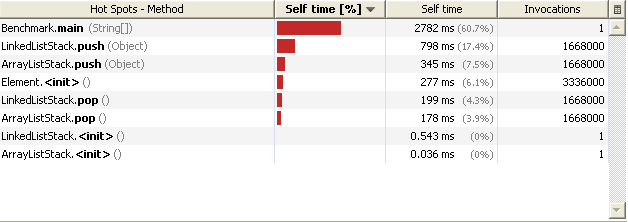
So a significant difference only appears when pushing 10,000 elements, and after that, it degrades quite dramatically in favour of the LinkedList.

ArrayList that bad?

Now, it appears that we have kind of disadvantaged ArrayList here by choosing the worst case scenario for insertion: inserting at index 0, which means that the implementation will have to enlarge the internal array if needed, shift all the objects by 1, and insert the element at 0.

So let’s have more specific implementation where we’ll be "pushing" at the end (and therefore "popping" at the end too). Here is our new ArrayListStack:

import java.util.ArrayList;

 public class ArrayListStack<T> implements Stack<T> {
    private ArrayList<T> list = new ArrayList<T>();

    public T pop() {
        if (!list.isEmpty()) {
            return list.remove(list.size() - 1);
        } else throw new IndexOutOfBoundsException("Cannot pop an empty stack");
    }

    public void push(T element) {
        list.add(element);
    }

    public int size() {
        return list.size();
    }
}

To be fair, let’s give LinkedList its own implementation, with getFirst() and removeFirst():

import java.util.LinkedList;

 public class LinkedListStack<T> implements Stack<T> {
    private LinkedList<T> list = new LinkedList<T>();

    public T pop() {
        if (!list.isEmpty()) {
            return list.removeFirst();
        } else throw new IndexOutOfBoundsException("Cannot pop an empty stack");
    }

    public void push(T element) {
        list.addFirst(element);
    }

    public int size() {
        return list.size();
    }
}

And now you’re in for a good surprise: here are the results!

pushing 1000 elements

arraylist stack push: 0.0
linkedlist stack push: 0.0

popping 1000 elements
arraylist stack pop: 0.0
linkedlist stack pop: 0.0

pushing 2000 elements

arraylist stack push: 0.0
linkedlist stack push: 0.007499999832361937

popping 2000 elements

arraylist stack pop: 0.007499999832361937
linkedlist stack pop: 0.007499999832361937

pushing 5000 elements

arraylist stack push: 0.0
linkedlist stack push: 0.0

popping 5000 elements

arraylist stack pop: 0.0
linkedlist stack pop: 0.0

pushing 10000 elements

arraylist stack push: 0.0
linkedlist stack push: 0.0

popping 10000 elements

arraylist stack pop: 0.0
linkedlist stack pop: 0.0

pushing 50000 elements

arraylist stack push: 0.0
linkedlist stack push: 3.1999999191612005E-4

popping 50000 elements

arraylist stack pop: 3.1999999191612005E-4
linkedlist stack pop: 3.1999999191612005E-4

pushing 100000 elements

arraylist stack push: 1.5999999595806003E-4
linkedlist stack push: 3.100000030826777E-4

popping 100000 elements

arraylist stack pop: 3.100000030826777E-4
linkedlist stack pop: 3.100000030826777E-4

pushing 500000 elements

arraylist stack push: 2.800000074785203E-4
linkedlist stack push: 4.3799998820759356E-4

popping 500000 elements

arraylist stack pop: 4.6999999904073775E-4
linkedlist stack pop: 4.6999999904073775E-4

pushing 1000000 elements

arraylist stack push: 9.40000027185306E-5
linkedlist stack push: 4.3700000969693065E-4

popping 1000000 elements

arraylist stack pop: 4.529999860096723E-4
linkedlist stack pop: 4.6800001291558146E-4

In these results, ArrayList performs better, and after 1,000,000 the difference is actually stunning. And that’s even before adding the extra optimization of sizing the list at initialization (thus preventing the overhead of redimensioning the array).

9.png

The thing is, adding at the end of an ArrayList will perform better than LinkedList, so this means that for a stack implementation (where you push and pop at the same end), ArrayList is quite a good pick.

Reverse an Array

Reversing an array. I can’t really remember the last time I needed to do this, but one thing is for sure, if I did, I didn’t write an ad hoc piece of code to do this: I probably used an ArrayList to do the trick, or some third-party library. But for the sake of education, let’s have a quick look at different solutions.

The Classic way

This method is a classic of algorithm classes: use a temporary value to swap two indexes in the array:

public class NumberReversal {

  public static void reverseArray(int[] array) {
        if (array == null) {
            return;
        }
        int i = 0;
        int j = array.length - 1;
        int tmp;
        while (j > i) {
            tmp = array[j];
            array[j] = array[i];
            array[i] = tmp;
            j--;
            i++;
        }
    }

  public static void main(String[] args) {
        int[] test = { 1, 2, 3, 4 };
        reverseArray(test);
        for (int i : test) {
            System.out.println(i);
        }
    }
}

Recursion

Recursions make CS teachers happy, so here is a solution that uses one. I personally find it hard to read, and recursions, despite being teachers’ pet, are usually frowned upon in real life. It relies on 2 key methods: System.arraycopy, which copies an array into another, and Arrays.copyOfRange. The 2 methods do pretty much the same thing, except Arrays.copyOfRange does some bond checking… and uses System.arraycopy. I used them both so that you are aware of them.

import java.util.Arrays;

public class NumberReversal {

  static int[] concat(int[] a, int[] b ) {
        int[] c = new int[a.length + b.length];
        System.arraycopy(a, 0, c, 0, a.length);
        System.arraycopy(b, 0, c, a.length, b.length);
        return c;
    }

  public static int[] reverseArray(int[] array) {
        if (array.length == 0) {
            return new int[] {};
        } else if (array.length == 1) {
            return array;
        } else {
            // recursion: concatenate the reverse of the end of the array 
            // to the first element (put at the end)
            return concat(
                    reverseArray(Arrays.copyOfRange(array, 1, array.length)),
                    new int[] { array[0] }
            );
        }
    }

  public static void main(String[] args) {
        int[] test = {1, 2, 3, 4};
        int[] reversed = reverseArray(test);
        for (int i: reversed) {
            System.out.println(i);
        }
    }
}

Using Collections

This solution forces you to deal with the int[] to Integer[] conversion, which is a bit of a pain. So this solution actually cheats by only using Integer objects. But if you wanted to use int[], you would have to do the conversion either “manually”, or using Apache common lang’s ArrayUtils.toPrimitive and ArrayUtils.toObject

import java.util.Arrays;
import java.util.Collections;
import java.util.List;

public class NumberReversal {

  public static void reverseArray(Integer[] array) {
        List list = Arrays.asList(array);
        Collections.reverse(list);

      array = (Integer[])list.toArray(new Integer[array.length]);
    }

  public static void main(String[] args) {
        Integer[] test = { 1, 2, 3, 4 };
        reverseArray(test);
        for (int i : test) {
            System.out.println(i);
        }
    }
}

The Sensible Solution

This one uses the Apache commons lang library which, a few days ago I was mentioning as one of my favourite libs.

import org.apache.commons.lang.ArrayUtils;

public class NumberReversal {
    public static void main(String[] args) {
        int[] test = {1, 2, 3, 4};
        ArrayUtils.reverse(test);
        for (int i: test) {
            System.out.println(i);
        }
    }
}

Using SWT with JRuby

JRuby is a Java implementation of the Ruby programming language. One of the strengths of a Java implementation is that Java libraries can be used within Ruby code, the Ruby way (and that is cool, as we have seen!); the weaknesses are that this means that the code is a lot slower to execute, and similar to what happens with Jython (the Java implementation of Python) the Java implementation lags behind the “official” version. This is obviously to be expected, and in fairness to the JRuby guys, they are pretty reactive!

This post will describe how to use SWT with JRuby. It is written for Ubuntu, but more than likely very similar on other platforms.

Setup

First, get JRuby: I’ll be using 1.4.0 (which was released last month). Install it in a location that I’ll be calling $JRUBY_HOME. Add $JRUBY_HOME/bin into your $PATH so that you can run the jruby command:

sebastien@kilkenny:~$ jruby --version
jruby 1.4.0 (ruby 1.8.7 patchlevel 174) (2009-11-02 69fbfa3) 
(Java HotSpot(TM) Client VM 1.6.0_12) [i386-java]

Get SWT from here (this article will be using SWT 3.5.1 for Linux), and extract swt.jar into $JRUBY_HOME/lib: that’s a quick way of making the jar available to JRuby.

Once everything is set up, we can begin with a very simple example.

First Quick Example

(I have posted the following example as a snippet on dreamincode at the time of writing, it is still awaiting approval)

require ’java’

display = org.eclipse.swt.widgets.Display.new
shell = org.eclipse.swt.widgets.Shell.new(display)
shell.setSize(800, 600)
shell.setText("First Example")

shell.setLayout(org.eclipse.swt.layout.RowLayout.new)
org.eclipse.swt.widgets.Button.new(shell, \\
             org.eclipse.swt.SWT::PUSH).setText("Click me!")

shell.open
# Classic SWT stuff
while (!shell.isDisposed) do
  display.sleep unless display.readAndDispatch
end
display.dispose

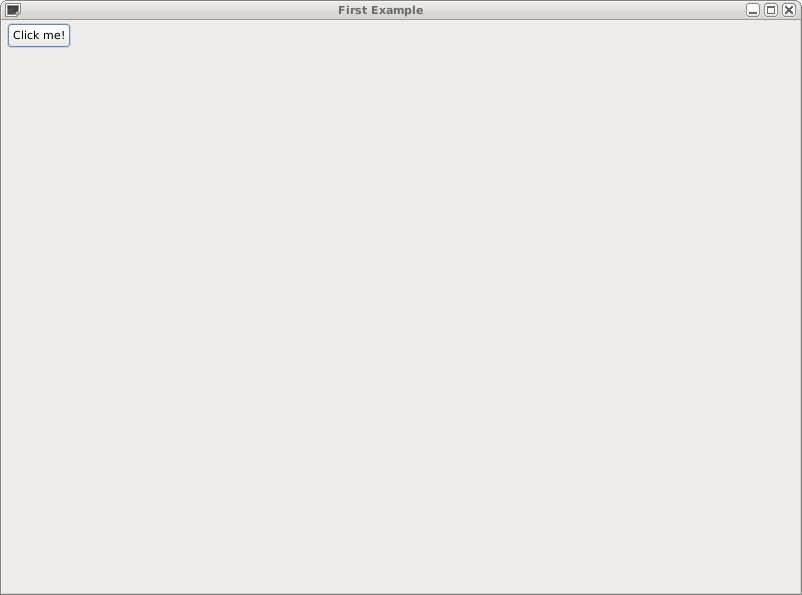
This opens a nice and simple window:

6.png

Typical to JRuby, the first thing we do here is require ’java’ to be able to call Java classes from our ruby code. And then, from then on, it is all SWT code: create a Display class, and with this Display, create a new Shell (window), whose size is 800×600. Then set the layout as RowLayout, and add a Button. Make the window visible with open, and the rest of the code is pretty much common SWT code to keep the window open until the application is shut down, at which point, the display is cleared up.

As you can see from above, the only tricky things are:

  • the fully-qualified names of the Java classes have to be provided (we’ll see a way of avoiding this in the next example);
  • static variables have to be accessed with ::

And Now, For a More Advanced Example

The more advanced example will read the RSS feed from weblogism, and fill in some labels, and put items in a table. Ruby provides a neat rss package, and good example of how to use it can be found here.

One of the things you’ll want to look at is the repetition of the Java packages: this is a bit tedious, so we have to find a way of avoiding this. One way is to call include_class to include the Java classes by their name. One trick is to list all the classes of a given package in an array, and to include them with an iterator:

%w(Display Shell Label Table TableColumn TableItem).each do
  |c|
  include_class "org.eclipse.swt.widgets." + c 
end

With this knowledge, I can now give you the example:

require ’java’
require ’open-uri’
require ’rss’

include_class "org.eclipse.swt.SWT"
# Neat little trick to include several classes from the same package.
%w(Display Shell Label Table TableColumn TableItem).each do
    |c|
    include_class "org.eclipse.swt.widgets." + c 
end
%w(GridLayout GridData).each do
    |c|
    include_class "org.eclipse.swt.layout." + c
end

# uppercase variable is constant
FEED_URL = ’http://www.weblogism.com/rss/’

class RssViewer
  attr_reader :shell, :display

  def initialize
    rss = get_messages

    @display = Display.new
    @shell = Shell.new(display)
    @shell.setSize(800, 600)
    @shell.setText("Second Example")

    gridlayout = GridLayout.new
    gridlayout.numColumns = 2
    @shell.setLayout(gridlayout)
    name = Label.new(shell, SWT::NONE)
    name.setText("Name:")
    name.setLayoutData(GridData.new(GridData::VERTICAL_ALIGN_END))
    Label.new(shell, SWT::NONE).setText(rss.channel.title)

    Label.new(shell, SWT::NONE).setText("URL:")
    Label.new(shell, SWT::NONE).setText(rss.channel.link)

    table = Table.new(shell, SWT::MULTI | SWT::BORDER | SWT::FULL_SELECTION)
    table.setLinesVisible(true)
    table.setHeaderVisible(true)

    gridData = GridData.new(GridData::FILL_BOTH)
    gridData.horizontalSpan = 2
    table.setLayoutData(gridData)

    # Set the header of columns.
    columns = %w(Title Date Author)
    columns.each{ |h| TableColumn.new(table, SWT::NONE).setText(h) }
    rss.channel.items.each do 
      |i|
      item = TableItem.new(table, SWT::NONE) 
      item.setText(0, i.title)
      item.setText(1, i.dc_creator)
      item.setText(2, i.date.to_s)
      puts i
    end
    # Each column then needs to be packed to display properly
    for i in 0...columns.size
      table.getColumn(i).pack()
    end

  end

  def show
    @shell.open
    while (!@shell.isDisposed) do
      @display.sleep unless @display.readAndDispatch
    end
    @display.dispose
  end

  def get_messages
    rss_content = ’’
    # Read URL
    open(FEED_URL) { |f| rss_content = f.read }
    # and parse.  "false" means "no validation"
    RSS::Parser.parse(rss_content, false)
  end
end

RssViewer.new.show

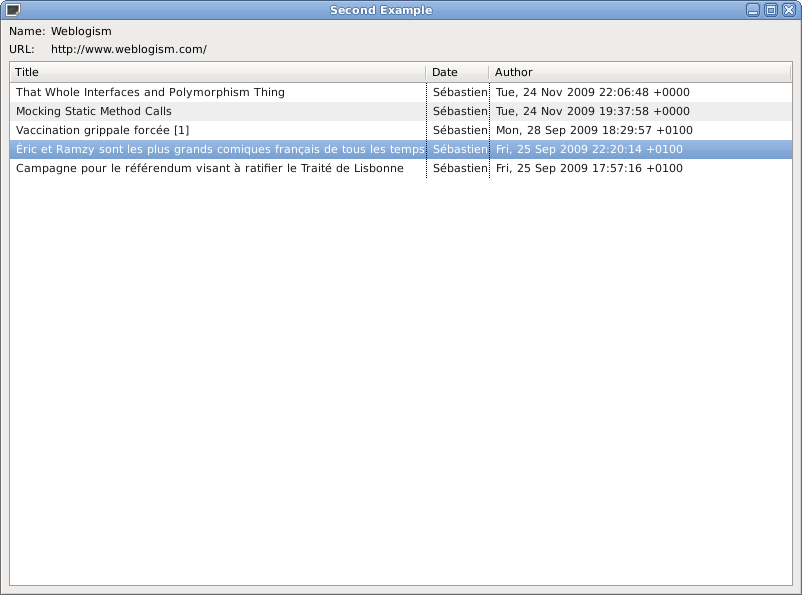
This simple snippet gives the following window:

7.png

Conclusion

The examples above are not that far away from the Java snippets proposed on the SWT web site. This shows how JRuby can be easy to learn if you are already familiar with Java – and you get to play with a few syntactic niceties like the iterators that ruby brings in.

However, it is true that performance can still be an issue on some big apps, but hopefully this will improve in the coming months.

Mocking Static Method Calls

When working with legacy code, my pet hate is to come across a Singleton, or a static method call that not only pulls out tons of dependencies, but also assumes that resources are out there, running.

The typical case I have been struggling with these past few months is “unit tests” assuming the application server is running to retrieve some EJBs. Yes, that’s right: unit tests that require the application server to run, with the database connections and all available. Not only you’re dragging the whole application to run to simply test one method, but it also takes far far too long. As it also requires the data sources to be available, you may also end up playing with test data in an unknown state and therefore get unpredictable results. In short, far from ideal from a unit testing point of view.

So you’re thinking, ok, I’ll mock the singleton/static method call, everything will be hunky-dory. But a singleton cannot be subclassed (the default constructor is private), and you cannot use polymorphism to mock a static method call. I had tried PowerMock to overcome this issue, but I have run into issues with JUnit 3, and couldn’t get it to work.

And today, after some search came the light at the end of the tunnel: jmockit.

Say you have a class BigUglyHelper which provides services as static methods:
notextile.

public class BigUglyHelper {
  public static String doStuff() {
    // Call an EJB session that calls an Entity bean, or Hibernate,
    // do fun stuff like paging or sorting, and return a String.
   return "BigUglyHelper";
  }
}

You are writing the class ClassUnderTest which, unfortunately, uses BigUglyHelper:

public class ClassUnderTest {
  public String getMyStuff() {
     String text = BigUglyHelper.doStuff();
     // do fancy things with text
     return text;
  }
}

Now, the unit test would be straightforward:

public class TestClassUnderTest extends TestCase {
  public void testGetMyStuff() {
    ClassUnderTest c = new ClassUnderTest();
    assertNotNull(c);
    // do other interesting asserts with c
  }
}

Straightforward? Nah. Remember, you need to have Weblogic (or WebSphere, or JBoss or…) running, you have to have your app deployed, you have to have proper data in your database, etc. Tsss.

So jmockit comes to the rescue, and that’s cool stuff. First, the mock for our class with the static methods:

public class SweetLittleMock {
        // Same signature as static method in real class
        public static String doStuff() {
            return "SweetLittleMock";
    }
}

And then, the test case.

public class TestClassUnderTest extends TestCase {

   @Override
    public void setUp() {
        Mockit.redefineMethods(BigUglyHelper.class, SweetLittleMock.class);
    }

   public void testGetMyStuff() {
        ClassUnderTest c = new ClassUnderTest();
        assertNotNull(c);
        assertEquals("SweetLittleMock", c.getMyStuff());
    }
}
 

The astounding thing is that I only have jmockit and JUnit in the classpath, so there is no jar dependency headache, and that’s for me a big big plus.

Singleton Testing

For testing singletons, it is not as simple, as getInstance() returns a reference to the Singleton. You have to use expectations and the cool thing about them is that they behave just the way you’d want a mocking framework to.

So, here is our nasty Singleton:

public class Singleton {
    private static Singleton instance;

   private Singleton() {
    }

   public static Singleton getInstance() {
        if (instance == null) {
            instance = new Singleton();
        }
        return instance;
    }

   public String superService() {
        return "Singleton";
    }
}

with its superService() (so super it can only be provided by a single instance!!). This singleton is used by MyNeatClass that we’re trying to unit test:

public class MyNeatClass {

   public String doStuff() {
        return Singleton.getInstance().superService();
    }
}

There’s not much to it, but the key thing is that the Singleton is drawing unwanted resources into the unit test, and we don’t want that. So here is out test class (note that it extends JMockitTestCase since we are using JUnit 3. Annotations are the way to go if you’re on JUnit 4):

public class TestMyNeatClass extends JMockitTestCase {

    public void testDoStuff() {
        new Expectations() {

            Singleton singleton;

            {
                Singleton.getInstance();
                returns(singleton);
                singleton.superService();
                returns(“MockSingleton”);
            }
        };
        MyNeatClass neatClass = new MyNeatClass();
        assertNotNull(neatClass.doStuff());
        assertEquals(“MockSingleton”, neatClass.doStuff());
    }
}

The important bit is the Expectations: it is defined as an anonymous inner class. It defines a mock field (singleton), and an initialization block that records the method calls, and indicates what these method calls should return. For example, Singleton.getInstance(); will return singleton (return(singleton);).

jmockit definitely becomes a weapon of choice when dealing with legacy code where you are trying to bring in unit tests.

That Whole Interfaces and Polymorphism Thing

This post is intended as a follow-up to this discussion in the dreamincode.net Java forum, and this follow-up. I don’t normally get drawn into these sterile debates, but the thing that ticked me off here was that it is all done under the cover of “educating people.” Being wrong is one thing, being wrong and wrapping falsities under layers of apparent knowledge to impart “wisdom” to others whilst being condescending towards other posters is another one.

The whole point of this post is to discuss the incorrect statement that “interfaces in Java cannot define a IS-A relationship.” And explain why this is incorrect.

I have indeed been told that the following is absurd and nonsensical:

// Payable is an interface, and Employee implements Payable
Payable employee = new Employee();

In normal cases, I would have laughed it off, and moved on (or in the case of an interview, I would have thanked the candidate, and parted ways). But there is a pedagogical dimension to all this, so here I am again.

I would certainly dislike being criticized for not giving references, so at the end of this post I have listed a few; however, I’ll be mostly speaking about my own experience as a Java developer, so yeah, this will be biased big time.

As said before, I truly believe that the statement “using Java interfaces for polymorphism is absurd” is symptomatic of 3 things:

  • The misunderstanding of what Java interfaces are all about,
  • The scorn the implements keyword is treated with,
  • The immoderate idolization some developers devote to inheritance.

Interfaces in Java

The Spec

Let’s look at the Java Language spec has to say about interfaces:

An interface declaration introduces a new reference type whose members are classes, interfaces, constants and abstract methods. This type has no implementation, but otherwise unrelated classes can implement it by providing implementations for its abstract methods. (…) A variable whose declared type is an interface type may have as its value a reference to any instance of a class which implements the specified interface.

This means that (i) an interface is a type (and we could actually stop this post here), and (ii) this is totally valid stuff:

Payable employee = new Employee();


if Employee implements Payable.

(This is also valid, mind you:

public interface Payable {
    long baseSalary = 10000;
    public void pay();
}
public class Employee implements Payable {
    public void pay() {
        System.out.println("pay Employee " + f);
    }

    public static void main(String[] args) {
        Payable p = new Employee();
        p.pay();
    }
}

but that’s irrelevant.)

However, the fact it is valid code has never been in doubt, but rather the intent was. Right so, let’s carry on.

Interface as a Type

To quote the Java Tutorial, in the Using Interfaces as Types ([sarcasm]wow, how can these Sun people use such a nonsensical title?[/sarcasm]) section:

When they [“relatable” objects] implement Relatable, they can be of both their own class (or superclass) type and a Relatable type. This gives them some of the advantages of multiple inheritance, where they can have behavior from both a superclass and an interface.

The interesting thing here is the word “behaviour.” The interface brings behaviour to a class; we’ll see what this means in terms of object-oriented programming. We will also see that you can’t just go and remove an interface to prove a heavily-flawed demonstrative point.

instanceof

instanceof is the type comparison operator in Java. In the case of an interface, this is indeed valid:

new Employee() instanceof Payable

and returns true.

According to the Java Language spec (See here):

It is a compile-time error if the ReferenceType mentioned after the instanceof operator does not denote a reifiable type (§4.7).

Which does indicate, if there was any doubt about it, that interfaces are reifiable types.

The Serializable case

To finish with this Java interface analysis, let’s look at the Serializable interface. Wait. It’s empty, what is there to look at? Precisely. What is an empty interface supposed to bring to the table? What is the point of marking classes as Serializable when there is no method to implement? The point is to give an object the Serializable type to use polymorphism when invoking the serialization mechanisms. In practice, this is done through the instanceof keyword, but if the object is not of type Serializable, the code throws a NotSerializableException.

Interfaces and OOP

Apparently, it was not just a Java problem anymore. The big guns had to be taken out, and OOP was invoked in the grand pursuit of Java interfaces slurring.

First of all, let’s make something clear: Java interfaces are not a bijection to interfaces in the OOP sense. We have on one hand a programming language feature, and on the other hand an OOP concept. It is not just that the 2 sets mismatch: they are not on the same plane at all.

Interface vs. Implementation

When it comes to design, Design Pattern/ is the unavoidable reference. The section called /Class versus Interface Inheritance discusses at length the importance of programming to an interface.

It’s important to understand the difference between an object’s class and its type.

An object’s class defines how the object is implemented. The class defines the object’s internal state and the implementation of its operations. In contrast, an object’s type only refers to its interface—the set of requests to which it can respond. An object can have many types, and objects of different classes can have the same type.

In this chapter appears the principle that any design-savvy developer knows: “/Program to an interface, not an implementation/“.

Don’t declare variables to be instances of particular concrete classes. Instead, commit only to an interface defined by an abstract class.

What do they mean by “programming to an interface”? It means that instead of programming around a specific implementation, it is preferable to pass around an interface (in the OOP sense, not necessarily Java interface) and make sure the behaviour is decided at runtime.

The reason is quite straightforward: you don’t want to be tied to a particular implementation. The classic textbook example of this is the Collection interface. Beginners usually code collections like this:

ArrayList words = new ArrayList();

All the subsequent method calls then would take an ArrayList<String> as a parameter.

The problem with this approach is that if one day, it is decided to switch to a different implementation (to get a synchronized collection, or to have the words sorted directly with TreeSet, or to switch to the kick-ass Google Collections library), you’ll have to go through lots of code and do the change. Ideally, you want to avoid this at all costs. But by tying your code to an implementation, you leave the door open to subsequent changes – and developers get annoyed with interface changes (interface as in API, obviously). “WTF? This method was requiring an ArrayList last week, and now it requires a TreeSet?!”

(Where I work, changing an interface potentially means that client jars to Web services have to be redeployed, and the 2 or 3 major in-house applications have to be re-released to include the change. That’s usually a messy affair, and always a bit risky, so you usually avoid changing the exposed services)

On the other hand, if you write:

Collection words = new ArrayList();

you can hide the actual implementation, and parse your elements with Iterator without worrying about potential changes.

The same way you want to program to interface to avoid tight coupling with a specific implementation, you also want to avoid inheriting implementation, as changes to the implementation can have adverse effect on all the subclasses.

Avoid coupling, favour composition over inheritance, program to interfaces, not implementations, that’s the OO principles that any developer would find when opening a decent OOP book. Interestingly enough, this has been discussed at length elsewhere.

Questions?

But if I remove the interface, it is working still. You’ve lost nothing.

My oh my. Again, any candidate stating this in an interview would be out of the door in the next minute.

For this one, we’ll need an example. Let’s say, hey, that Payable one.

public interface Payable {
  public void pay();
}

public class Employee implements Payable {
  public void pay() {
    System.out.println("pay Employee");
  }
}

public class Contractor implements Payable {
  public void pay() {
    System.out.println("pay Contractor");
  }
}

public static void main(String[] args) {
  Employee e1 = new Employee();
  e1.pay();

  Payable e2 = new Employee();
  e2.pay();

  Payable e3 = new Contractor();
  e3.pay();

  Contractor e4 = new Contractor();
  e4.pay();
}

This prints out:

pay Employee
pay Employee
pay Contractor
pay Contractor

Now remove Payable. Not only they did lose something, but they lost something huge: they lost their type! All these methods relying on the interface would fail:

public void hire(Payable p) {
// ...
}

Contractor and Employee also lost their relationship to each other. You just can’t go removing stuff from your design without removing the precious information it was bringing in the first place. That would be just as bad as removing Payable from below:

public class Payable {
  public void pay() {
    System.out.println("pay Payable");
  }
}

public class Employee extends Payable {
  public void pay() {
    System.out.println("pay Employee");
  }
}

public class Contractor extends Payable {
  public void pay() {
    System.out.println("pay Contractor");
  }
}

Similar to Payable as an interface, Payable as a class “doesn’t do anything”, so let’s go and remove it; but again here, you lose a vital thing: the fact that Employee and Contractor are Payable. Everyone can see this is silly, and yet this is exactly the same thing with interfaces.

One could argue that Payable could have defined other behaviour not overridden by the subclasses, but here it is not the case: it happens in real life too. Usually, you’d make this class abstract, but it’s not always in your control: Payable could be a third-party class you’re trying to adapt (as in, the Adapter design pattern) into your own application.

The confirmation to this is the Serializable example mentioned earlier which must be the epitome of the “useless” interface (it doesn’t define any method): remove it, and it makes a world of difference.

Hey, but Payable is an interface name, it wouldn’t be a class name

This is just a naming convention. Some people suffix their interfaces with -able, some prefix it with I (like IComponent). The problem with this naming convention is that it has contributed to the under-component status interfaces are suffering from. More and more you see this trend being reversed to put the onus back onto the interface (especially with the coming of Spring), and interfaces have the component name, and implementations have suffixed with Impl:

public interface Employee {
  public void pay();
}

public class EmployeeImpl implements Employee {
  public void pay() {
    System.out.println("pay EmployeeImpl");
  }
}

This is quite some psychological leap! What this means is that the focus is now on the interface, and that the implementation comes second. Just like it should.

You seem to be confusing abstract classes and interfaces. Are you?

No. I put them in the same bag because they both are useful to define an interface in the OOP sense. From a technical point of view, they are not the same, and they have their own pros and cons. Depending on the situation, you’ll want to favour one or the other, bearing in mind that if you inherit an abstract class, you cannot inherit anything else, but you can provide a default implementation, whereas you can implement lots of different interfaces with their own hierarchy, but face to change all implementing classes if you change anything. Choosing an abstract class over an interface makes also a strong design point (since indeed you cannot inherit anything else); however, this doesn’t mean the type provided by the interfaces is not also important, or should be discarded.

Conclusion

Interfaces have not been defined in the Java language just to “ensure some methods are implemented in the class that implements them”, or as a “CAN-DO” relationship. This view is far too simplistic as we have seen above, and there is no doubt (at least in my mind) that Java interfaces do provide a “IS-A” relationship, and that it is actually their whole raison d‘être. Unfortunately, failing to understand this means you cannot possible leverage technologies such as Spring, mocking, Java proxies, etc. but also shows a fairly questionable knowledge of Java itself, as everything in the language is based around this: serialization, collections, sorting, listeners, EJBs, etc.

^{1} The Java Language Specification, http://java.sun.com/docs/books/jls/

^{2} Learning the Java Language, http://java.sun.com/docs/books/tutorial/java/IandI/interfaceAsType.html

^{3} Design Patterns: Elements of Reusable Object-Oriented Software, Erich Gamma et al.

^{4} Code Complete, Steve McConnell.

Vaccination grippale forcée

Ça doit être comme la grippe, ça doit être de saison : ces jours-ci je reçois moultes électromissives d’un goût plutôt douteux m’invectivant de m’alarmer prestement quant à l’imminence d’une campagne de vaccination grippale forcée, sous l‘égide de l’OMS qui est bien entendu de mêche avec les Gouvernements et l’industrie pharmaceutique.

D’une part, j’abhorre les chaînes de mail : ce ne sont jamais les bonnes et elles sont toujours polluées par une quantité de fautes d’orthographe astronomique. Avez-vous déjà vu une chaîne de mail manicoréenne qui exhorterait à réduire ses émissions de CO2 et surtout à faire suivre à 10 contacts, sinon vous serez maudits sur 13 générations (ce que vous serez de toute façon si vous ne faites rien, ah ah, l’ironie) ? Ensuite, les théories du complot m’amusent, mais quand elles se répètent ad nauseam, elles deviennent… nauséeuses et nauséabondes. Enfin, quand on sait qu’elle est destinée à un public vivant en France, ça me soupèse la gauche sans toucher la droite.

Donc, disais-je, on me dit qu’il faut que je me soulève, « malgré qu’il (sic) nous manque beaucoup de pages à ce dossier », ci-joint un joli ppt des familles avec tout ce qu’il faut d‘éléments béton pour étayer sans l’ombre d’un poil fessier la perspective d’une conspiration templière. Alors, décidai-je, je vais m’informer dans la plus pure tradition éolassienne. La réponse est rapidement venue, sous la forme d’une question/réponse du SNPI. Tout d’abord, rien n’oblige quelqu’un à se vacciner, cf. Article L3111-4 du Code de la santé publique :

“Une personne qui, dans un établissement ou organisme public ou privé de prévention de soins ou hébergeant des personnes âgées, exerce une activité professionnelle l’exposant à des risques de contamination doit être immunisée contre l’hépatite B, la diphtérie, le tétanos, la poliomyélite et la grippe.”

Décret n° 2006-1260 du 14 octobre 2006, art. 1 :
“L’obligation vaccinale contre la grippe prévue à l’article L. 3111-4 du code de la santé publique est suspendue.”

(C’est signé Dominique de Villepin, donc les conspiratistes pourront aller le bisouiller). Ensuite, si quelqu’un vous force à vous vacciner, cela relève apparemment du Code pénal (Article 432-4) :

Le fait, par une personne dépositaire de l’autorité publique ou chargée d’une mission de service public, agissant dans l’exercice ou à l’occasion de l’exercice de ses fonctions ou de sa mission, d’ordonner ou d’accomplir arbitrairement un acte attentatoire à la liberté individuelle est puni de sept ans d’emprisonnement et de 100 000 euros d’amende.

IANAL, mais apparemment, ça veut dire qu’en l‘état, non seulement, on ne peut pas vous forcer à vous vacciner, mais qu’en plus, on risque gros à essayer de le faire. Voilà une réponse à une chaîne de mails comme je les aime.

Bien entendu, on me répondra qu‘« ils » vont changer la loi pour satisfaire leurs desseins et vous inoculer le mal, et je rétorquerai que vous devriez tout de même avoir confiance en le législateur que vous vous êtes choisi, non ? Non ?